Poshmark is launching a new seller program this fall. If you qualify, your listings get a trust signal that buyers can see, and you show up in a new search filter for reliable sellers. If you don't qualify, that filter can hide your closet from buyers who use it.
You don't apply for it. Poshmark checks your numbers every day and turns your status on or off automatically.
Poshmark announced the program on July 30 and said it goes live in October. That gave sellers 90 days to get ready. Most of that time is gone. Here is what the program requires, and what you can still fix in the weeks that are left.
The five numbers that decide it
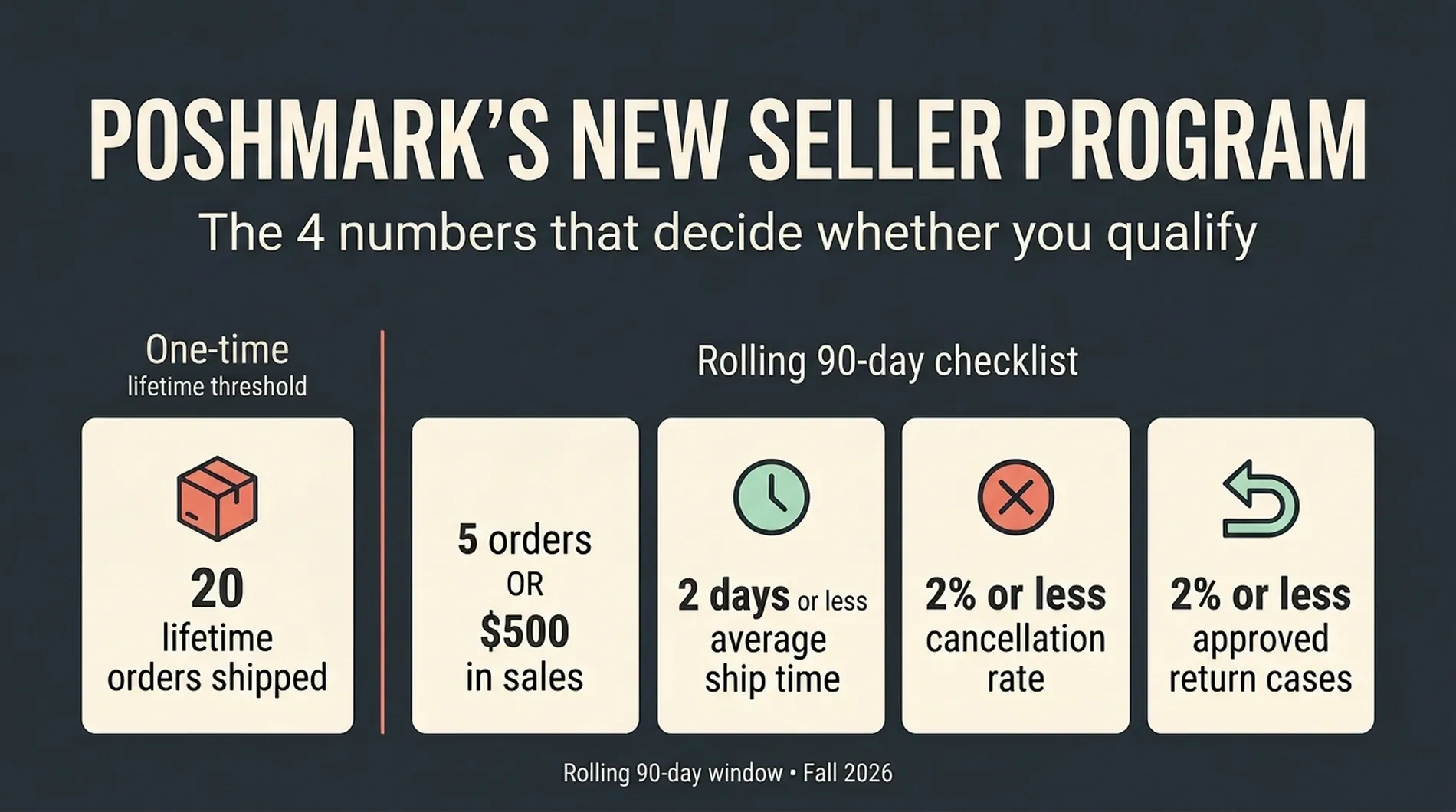
There are two parts. First, a one-time requirement:
- 20 lifetime orders shipped. This never resets.
Second, four things that must all be true for your last 90 days:
- Ship 5 or more orders, or reach $500 in sales (C$500 in Canada). Either one counts.
- Average ship time of 2 days or less.
- Cancellation rate of 2% or less.
- Approved return case rate of 2% or less.
All four must be true at the same time. A great ship time does not make up for too many cancellations. Miss one, and you're out until it comes back in line.
Ship time counts business days only
Weekends and shipping holidays don't count against you. A sale on Friday night that ships Monday morning does not count as a three-day ship.
Poshmark switched ship time to a 90-day average in April. A slow stretch from two years ago no longer matters. A slow stretch last month does.
The window keeps moving
There is no application, no review date, and no renewal. Poshmark recalculates your last 90 days every day.
- The day you meet every requirement, you qualify.
- If a number slips, your status disappears.
- When your numbers recover, your status comes back on its own.
A bad week won't lock you out for a year. It will count against you for 90 days.
Where to check your numbers
Open Posh Stats. In the app, tap the Me tab, then Seller Tools, then Posh Stats under Insights. On the web, click your profile picture in the top right and follow the same path.
Posh Stats shows your lifetime shipped orders next to your 90-day ship time, cancellation rate, approved return cases, sales, and shipped orders. Only you can see it.
Check it before you change anything. You need to know which number you're missing.
This is not Posh Ambassador
Posh Ambassador is about community participation. This program is about how you sell. Your Ambassador badge stays on your profile, but it does not qualify you for the new program. Only your numbers do.
Why small closets have less room for error
The 2% limit is the same for everyone, but it does not feel the same.
- 50 orders in 90 days: one cancellation is 2%. You're fine.
- 20 orders: one cancellation is 5%. You're out.
- 5 orders: one cancellation is 20%.
Return cases are harder, because you don't control which ones Poshmark approves. Sellers have complained for a long time about inconsistent decisions. One approved case can knock a small closet out for a full 90 days.
Two things help. If your order count is low, aim for the $500 sales option instead. And sell more if you can. Every clean order makes one bad one hurt less.
What you can fix in a month
You can fix ship time. Every fast shipment pulls your average down right away.
You can prevent new cancellations and return cases. That is the most valuable thing you can do right now.
You may not be able to fix a rate that is already over 2%. A cancellation from early September stays in your window until December. If your volume is low, the math might not work out before October no matter what you do. The same goes if you are well short of 20 lifetime orders.
If that's you, keep going anyway. There is no deadline. You qualify whenever your numbers get there, whether that is October or January.
Your plan for the next 30 days
1. Write down your numbers
Pull six numbers from Posh Stats: lifetime shipped orders, 90-day shipped orders, 90-day sales, average ship time, cancellation rate, and approved return case rate. Mark each requirement pass or fail.
Then walk your inventory. Any listing for an item you can't physically find is a future cancellation. Delete it. Poshmark dropped its Excessive Listing Removal policy in July, so deleting listings no longer gets you in trouble.
2. Ship the next business day
Pick a packing time and stick to it every day. Anything sold on a business day goes out the next business day. That alone keeps you under two days. Print the label the day the sale comes in, even if the package leaves tomorrow.
One more deadline to know. A buyer can cancel any order that has not shipped after 7 days.
3. Stop cancellations before they happen
Most cancellations come from listings that don't match the item. Before you pack, check that the size, color, measurements, and flaws match the listing, and that bundles are complete. If something is off, message the buyer before you ship instead of shipping and hoping.
This 2% is separate from Poshmark's regular seller policy. Under that policy, cancelling more than 3% of orders in 90 days can get your account restricted or suspended. Buyer-requested and bundle cancellations don't count toward that one.
4. Win return cases with your descriptions
"Not as described" cases are won or lost on measurements, flaws, fabric, and true color. A photo of a flaw beats a sentence about it.
If a case opens, act fast. You can offer a partial refund or accept the return. If you do neither within 6 hours, Poshmark takes over the case. Poshmark has not said how each outcome affects your rate, so don't count on any of them protecting you.
5. Check weekly
The window moves one day at a time, so weekly is enough. Poshmark also says a Seller Hub is coming to manage your closet in one place, and Smart List AI is getting an update. Watch the seller updates section of Poshmark's blog for both.
Where ListForge fits
The easiest cancellation to miss is a double sale. An item sells on Poshmark, stays live on eBay, and sells again there.
ListForge catches that one. The browser extension checks the Poshmark listings it published every few hours while Chrome is open. When it finds one sold, it ends the eBay listing for the same item so it cannot sell twice. Poshmark publishing works through the same extension, because Poshmark has no seller API. eBay is a full direct connection.
It works in both directions. If the item sells on eBay first, ListForge queues the Poshmark listing for takedown and the extension marks it Not For Sale the next time Chrome is open. If your browser isn't available, you get an alert to take it down yourself. ListForge does not manage Poshmark sales, reprice, relist, or update quantities there, and it does not read your Posh Stats. It will not qualify you for the program.
Sources
support.poshmark.com/s/article/seller-program - Poshmark Support: What Is the New Performance-Based Seller Program?
blog.poshmark.com/2026/07/30/60046 - Poshmark Blog: Posh Preview, July 30, 2026
blog.poshmark.com/category/community-2/seller-updates - Poshmark Blog: Seller Updates Category
blog.poshmark.com/2026/04/06/sellerupdatesapril6 - Poshmark Blog: Seller Updates, April 6, 2026
blog.poshmark.com/2026/03/23/58683 - Poshmark Blog: Policy Update, March 23, 2026
support.poshmark.com/s/article/520204343 - Poshmark Support: How to Cancel a Delayed Order
support.poshmark.com/s/article/return-case-US - Poshmark Support: What Happens When My Buyer Has Opened a Return Case?
valueaddedresource.net/poshmark-scraps-excessive-listing-removal - Value Added Resource: Poshmark Scraps Excessive Listing Removal Policy, Adds New Seller Recognition Program, by Liz Morton, July 23, 2026, updated August 11, 2026
blog.poshmark.com/2026/08/31/60225 - Poshmark Blog: Poshmark Seller Update, August 31, 2026