
For high-volume sellers
Six hundred listings live. When did you last touch any of them?
ListForge watches every one and brings you the move — a price change, an offer to the people watching, a markdown — with the reason attached. You approve.
- Works your live eBay store
- You approve every move
- 2,000 free credits, no card
- Review the queue from your phone
The ceiling
Listing was never the bottleneck.
You can shoot and list all day. What you can't do is get back around to the several hundred already up — each one going quiet in its own way, on its own schedule.
So the watchers never get an offer, the stale ones never get a drop, and the store slowly turns into a warehouse you're paying to look at.
What it actually does
It's watching all of them.
Every listing you hand it, checked again and again — not once when you listed it. Price changes, offers to the people watching, markdowns, promoted listings.

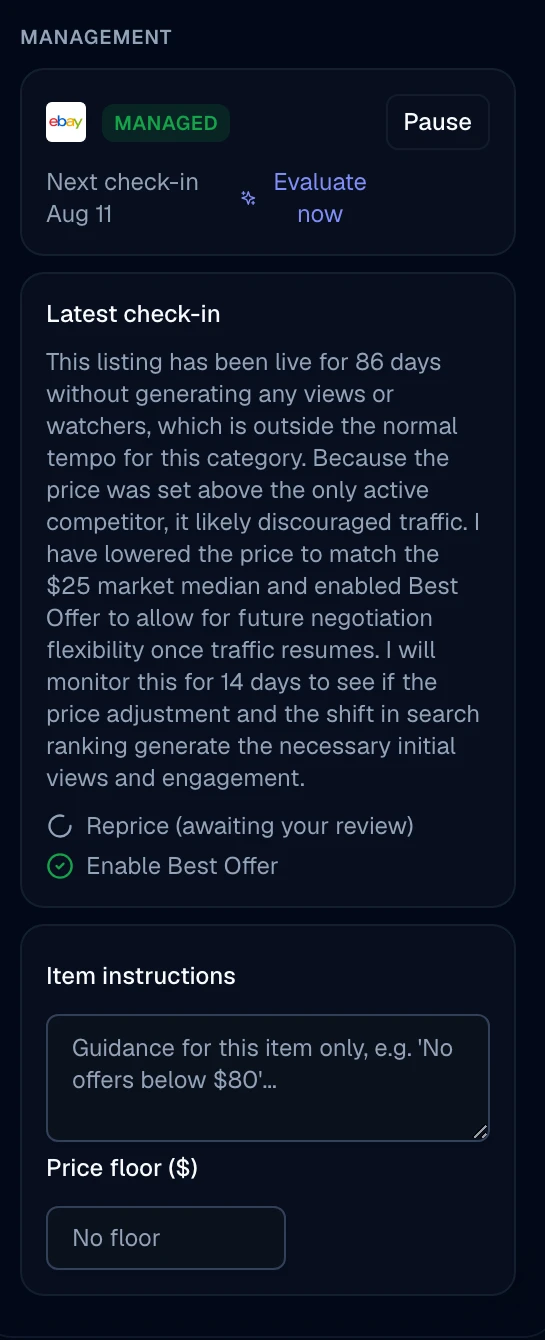
The move arrives already worked out.
It tells you what it did, what it wants to do next, and why it thinks so. You're reading a decision, not making one from scratch at eleven at night.
The reprice sits there marked awaiting your review until you deal with it.
Nothing touches eBay until you approve it.
Every move waits for you. Approve it or toss it — and connecting your store doesn't start anything on its own. You pick the listings it works, one at a time or all at once, and you can pause any of them.
Straight answers
The limits are hard, and you set them.
This is the part that decides whether you can leave it alone. So the caps are absolute, not suggestions.
- Offers to watchers
- Never more than 20% off · At least a week between offers
- Price drops
- Never more than 10% at a time · Never more than 30% total · At least a week apart
- Promoted listings
- Never more than 8%
- Your floor
- A price it can never go under, period
When a planned drop runs into one of these, the move gets held to the cap and sent to you for review rather than quietly going ahead at the number it wanted.
Before you start
Questions, answered
- Does it change prices on its own?
- Not unless you turn that on. Out of the box, every move waits for your approval before anything touches eBay.
- What stops it dropping a price too far?
- The limits are hard: never more than 10% at a time, never more than 30% total, at least a week apart — and a floor you set that it can never go under.
- If I connect my eBay store, does it start working everything?
- No. Connecting doesn't start anything. You choose which listings it works — one at a time, or all at once.
- What does it actually do to a listing?
- It keeps checking it and brings you moves — a price change, an offer to the people watching, a markdown, a promoted-listings change — each with the reason behind it. You approve it or toss it.
Point it at your store free.
2,000 credits, no card. Start with a pilot set and see what it brings you.
Free to start · No card · Cancel any time